

Web Setup
Start Network Card Setup to set up the printer's network settings.
Enabling the Web Setting
-
Start Network Card Setup.
-
Select a printer from the list.
-
Select [Web Page Settings] from the [Printer] menu.
-
Enable the Web setting, and then click [Save].
-
Enter the password, and then click [OK].
-
The factory default password is the last six digits of the MAC address.
-
The password is case sensitive.
The printer network card restarts.
-
Opening the Web Page
-
Start Network Card Setup.
-
Select a printer from the list.
-
Select [View Printer Web Pages] from the [Printer] menu.
The Web page opens and the printer's status page is displayed.
Changing the Password
You can change the password for setting the printer.
Note
-
The factory default password is the last six digits of the MAC address.
-
The password is case sensitive.
-
Start Network Card Setup.
-
Select a printer from the list.
-
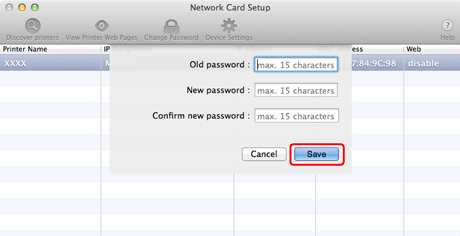
Select [Change Password] from the [Printer] menu.
-
Enter the current password.
-
Enter the new password twice for confirmation.
-
Click [Save].
The printer network card restarts.