Installation Environment
Install the printer in the following environment.
Ambient temperature: 10℃ to 32℃
Ambient humidity: 20% to 80% RH (relative humidity)
Maximum wet bulb temperature: 25℃
Note
-
Use care to prevent condensation. It may cause a malfunction.
-
If installing your printer where the ambient humidity is 30% or below, use a humidifier or antistatic mat.

|
- Do not install this machine in a location where temperature becomes high or near open flames.
- Do not install this machine in a location where chemical reactions may occur (such as a laboratory).
- Do not install this machine near alcohol, thinners, or other flammable solvents.
- Do not install this machine in a location within the reach of children.
- Do not install this machine in an unstable location (such as on an unsteady stand or slanted location).
- Do not install this machine in a location with high level of humidity or dust, or in a location where the machine is exposed to direct sunlight.
- Do not install this machine in an environment where it is exposed to salty air or corrosive gas.
- Do not install this machine in a location where it is exposed to a high level of vibration.
- Do not install the printer in a location where its vent hole is blocked.
|

|
- Do not install this machine directly on a thick rug or carpet.
- Do not install this machine in a closed room or other locations with bad circulation and ventilation.
- If you use this machine in a small room continuously for an extended period of time, make sure to ventilate the room.
- Install this machine away from a source that emits strong magnetic fields or noise.
- Install this machine away from a monitor or television.
- Carry this printer by holding both its sides.
|
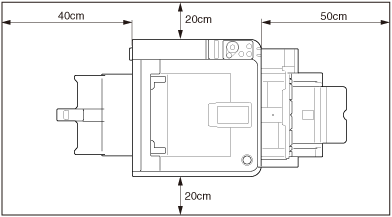
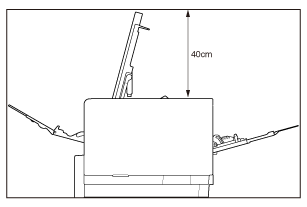
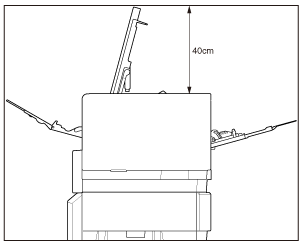
Installation Space
Install the printer on a flat surface that is wide enough to accommodate the legs of the machine.
Secure enough space around the printer.