

Installing the Wireless LAN Module (Optional) to the Printer
Installing the wireless LAN module (optional) to the printer allows you to use the wireless LAN function.
Note
The wireless LAN module (optional) may not be available in some countries and regions.
-
Set [WIRELESS MODULE] to [ENABLE] on the BOOT MENU.
About Administrator Menu Items and Functions in the Printer (BOOT MENU)
-
Turn the printer off, and then unplug the power cord.
Note
Wait for at least 1 minute after unplugging the power cord, and then proceed to the next step.
-
Open the connector cover by pressing the knob (1) of the cover.


-
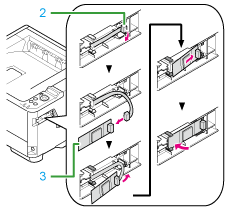
Connect the connector (2) of the connection cable to the wireless LAN module (3), and then install the module to the printer.
-
Put the cover back.

-
Select [CONFIGURATION] > [NETWORK] from the operator panel, and then check that [WIRELESS INFO] is displayed.