

Names and Functions on the Operator Panel
This section describes the names and functions of components on the operator panel.
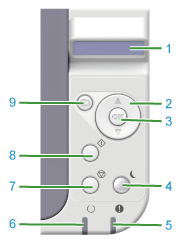
|
No. |
Name |
Function |
|---|---|---|
|
1 |
LCD panel |
Displays the printer status. |
|
2 |
Menu Scroll Buttons " |
Displays the menu mode. In menu mode, use these buttons to display the previous or next item. Hold down this button for 2 seconds or more to fast forward or fast return. |
|
3 |
OK button 
|
When the printer is online or offline: Press this button to enter menu mode. In menu mode: This button confirms the selected value. |
|
4 |
POWER SAVE button 
|
Enters or exits Power Save mode. (The indicator lights up in Power Save mode, flashes every 3 seconds in Sleep mode, and flashes every 6 seconds in Deep Sleep mode.) |
|
5 |
Attention indicator (red) |
ON: Warning is issued, but printing is possible. Flashing: Error has occurred; printing is not possible. OFF: Normal state. |
|
6 |
Ready indicator (green) |
ON: Data can be received (online). Flashing: Printer is processing received data. OFF: Data cannot be received (offline). |
|
7 |
CANCEL button 
|
Press this button briefly (less than 2 seconds) to delete data that is being printed or received. |
|
8 |
ONLINE button 
|
Switches the printer between online and offline states. Press this button during menu mode to exit the menu and return to online mode. |
|
9 |
BACK button 
|
If you press this button while a category of the menu mode is displayed, the printer goes online. If you press this button during menu mode, the display returns to the previous screen. |
 ", "
", " "
"