Replacing the Toner Cartridge
Replace the toner cartridge.
Memo
Please recycle toner cartridges. If you have to dispose of used toner cartridges, put them into polyethylene bags or other container, and be sure to follow the regulations or instructions of your local government.
-
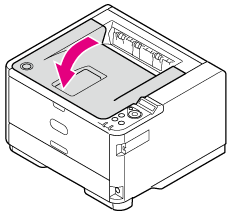
Press the [OPEN] button.

-
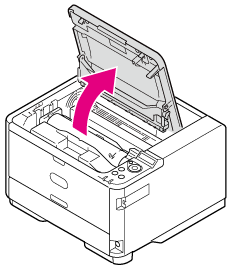
Open the top cover.
-
Rotate the blue lever of the toner cartridge in the direction of the
 (Unlock) arrow until it stops.
-
Gently lift and remove the toner cartridge.

Be sure not to throw the used toner cartridges into a fire.
The toner inside may scatter and ignite, resulting in burns.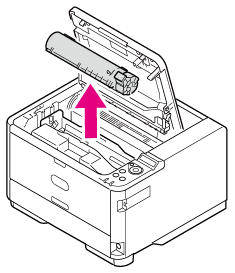
-
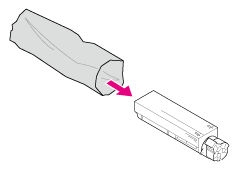
Take the new toner cartridge out of the package.
-
Shake the toner cartridge a few times vertically and horizontally.

-
Hold the toner cartridge straight and gently remove the tape.

-
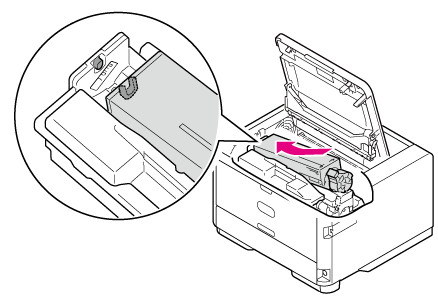
Insert the toner cartridge into the image drum by pushing the left end against the pin on the upper part of the image drum, and then put down the right end.
-
Rotate the blue lever of the toner cartridge in the direction of the
 (Lock) arrow until it stops.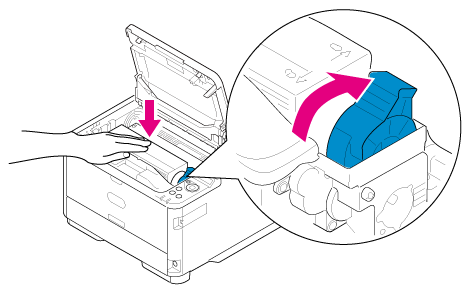
Note
If the toner cartridge is not securely attached, printing quality may decline.
-
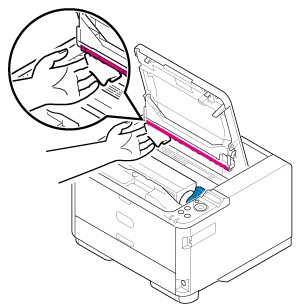
With a soft tissue paper, lightly wipe the lens surface of the LED head.
Note
Do not use solvents such as methanol and thinner. Using such solvents may damage the LED head.
-
Close the top cover.