

Removing the Printer Driver from a Computer (Mac OS X)
Note
You must log in as the administrator to complete this procedure.
-
Select [System Preferences] from the Apple menu.
-
Click [Printers & Scanners] ([Print & Scan] for OS X 10.7 to 10.8, or [Print & Fax] for OS X 10.6.8).
-
Select a device to remove, and then click [-].
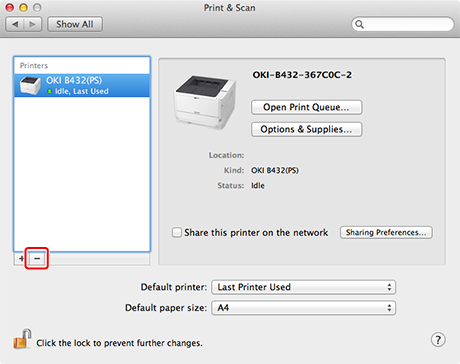
When a confirmation message is displayed, click [Delete Printer].
-
Close [Printers & Scanners] ([Print & Scan] for OS X 10.7 to 10.8, or [Print & Fax] for OS X 10.6.8).
-
Insert the "Software DVD-ROM" into a computer.
-
Double-click [OKI] > [Drivers] > [PS*] > [Uninstaller].
* [PCL] if using the PCL driver
-
Follow the on-screen instructions, enter the administrator's name and password, and then click [OK] until the uninstallation procedure is complete.
-
Click [Finish].
-
Remove the "Software DVD-ROM" from the computer.