

Setting Remote Print
|
Description |
|
|---|---|
|
1 |
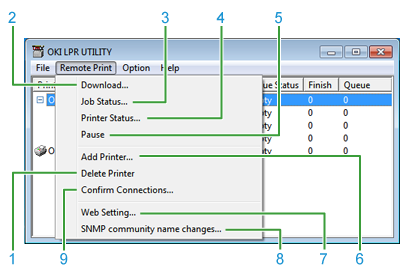
Deletes a printer that is registered in OKI LPR Utility. |
|
2 |
Downloads a file to the printer. |
|
3 |
Displays or deletes a print job. If multiple printers are used, you can manually forward a job to the same model manually. |
|
4 |
Displays the status that is displayed on the panel on the printer so that you can check the status on a computer. |
|
5 |
Suspends a job. |
|
6 |
Registers a printer in OKI LPR Utility. |
|
7 |
Starts the Web page on which you can change network settings for the printer or set a menu. |
|
8 |
Changes the SNMP community name of the printer. |
|
9 |
Changes the IP address of the printer, and sets automatic job transfer. |