

Forwarding Print Jobs Automatically
If you are unable to print because the selected printer is busy, offline, out of paper, or due to other reasons, you can automatically forward a print job to another printer.
Note
-
Print jobs can only be forwarded to another printer of the same OKI model as the one you are using.
-
Before forwarding a job, you must add a printer.
-
You must have the administrator rights.
-
Start OKI LPR Utility.
-
Select the printer to set.
-
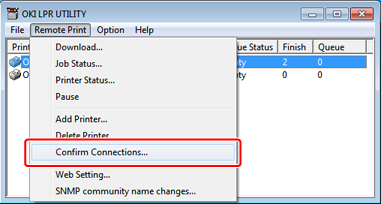
Select [Confirm Connections] from the [Remote Print] menu.
-
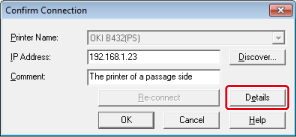
Click [Details].
-
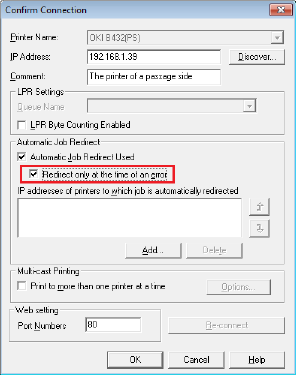
Select the [Automatic Job Redirect Used] check box.
-
To forward a job only if an error, such as "Offline" or "Running out of paper", occurs, select the [Redirect only at the time of an error] check box.
-
Click [Add].
-
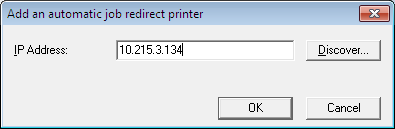
Enter the IP address of a forwarding destination printer, and then click [OK].
-
Repeat steps 7 to 8 until you specify all the forward destination candidates.
Memo
-
Click [Discover] to search for an OKI printer on a network.
-
To change the forward destination priority, select a printer to change its priority from [IP addresses of printers to which job is automatically redirected], and then click
 or
or  next to the box (To increase the priority, click , and to decrease the priority, click ).
-
-
Click [OK].