

Mac OS X PCL Printer Driver
You can switch between the [Layout], [Paper Handling], [Cover Page], [Setup], [Job Options], and [User Authentication] panels for settings.
[Layout] Panel
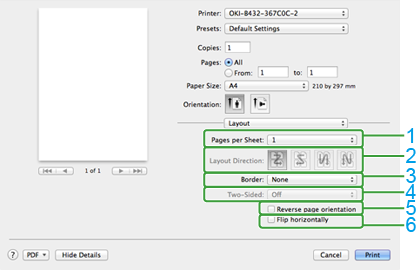
|
Item |
Description |
|
|---|---|---|
|
1 |
Pages per Sheet |
Selects the number of pages that is printed on a sheet of paper. |
|
2 |
Layout Direction |
Specifies the layout that is applied when printing multiple pages on a sheet of paper. |
|
3 |
Border |
Specifies a type of a boundary. |
|
4 |
Two-Sided |
Not available with the PCL driver. To specify duplex printing, use [Duplex] on the [Setup] panel. |
|
5 |
Reverse page orientation |
Reverses the direction of a page to print by selecting this check box. |
|
6 |
Flip horizontally |
Flips left and right to print by selecting this check box. |
[Paper Handling] Panel
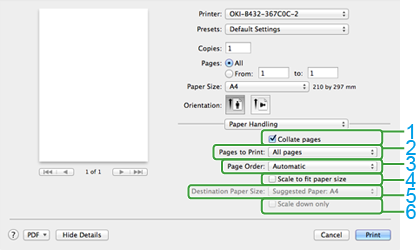
|
Item |
Description |
|
|---|---|---|
|
1 |
Collate pages |
Select this check box to print multiple documents in units of copies. |
|
2 |
Pages to Print |
Specifies pages to print. |
|
3 |
Page Order |
Specifies a page order to print. |
|
4 |
Scale to fit paper size |
Prints to fit a paper size. A document may not be printed correctly depending on the setting. |
|
5 |
Destination Paper Size |
Enlarges or reduces a document to fit the size of paper to print by selecting this check box. |
|
6 |
Scale down only |
Only reduces a document to fit the size of paper to print by selecting this check box. |
[Cover Page] Panel
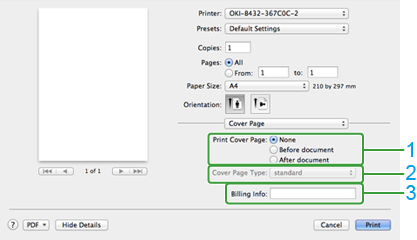
|
Item |
Description |
|
|---|---|---|
|
1 |
Print Cover Page |
Specifies the cover printing. |
|
2 |
Cover Page Type |
Specifies a string when printing the cover. |
|
3 |
Billing Info |
This function is not available. |
[Setup] Panel
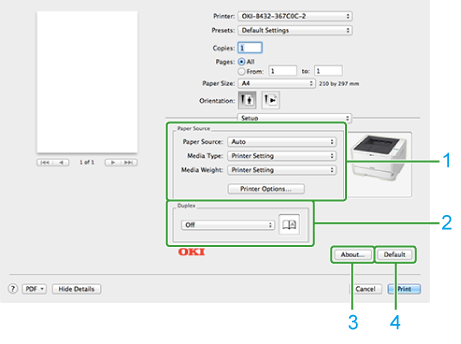
|
Item |
Description |
|
|---|---|---|
|
1 |
Media |
Specifies the paper feed method, media type, media weight, and other settings. |
|
2 |
Duplex |
Specifies when performing duplex printing. |
|
3 |
About |
Displays the version of the printer driver. |
|
4 |
Default |
Resets the settings in the panel to their default values. |
[Job Options] Panel
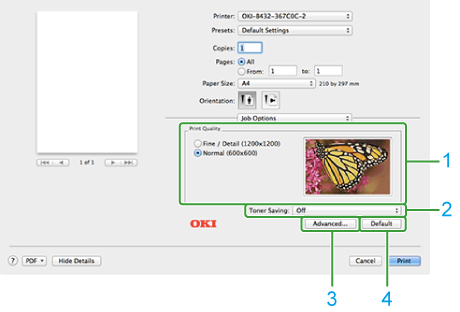
|
Item |
Description |
|
|---|---|---|
|
1 |
Print Quality |
Specifies the resolution for printing. |
|
2 |
Toner Saving |
Specifies the print density to save toner. |
|
3 |
Advanced |
Sets other print options. |
|
4 |
Default |
Resets the settings in the panel to their default values. |
[Image] Panel
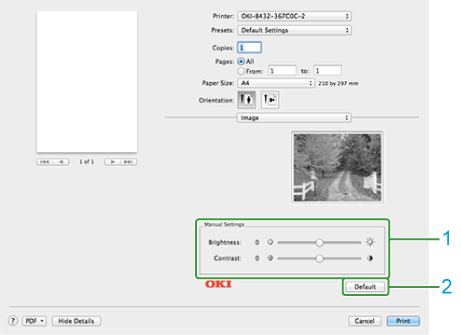
|
Item |
Description |
|
|---|---|---|
|
1 |
Manual Settings |
Specify the brightness and contrast. |
|
2 |
Default |
Resets the settings in the panel to their default values. |
[User Authentication] Panel
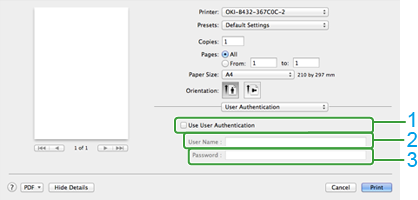
|
Item |
Description |
|
|---|---|---|
|
1 |
Use User Authentication |
Select the check box to apply user authentication when printing. |
|
2 |
User Name |
This is the user name for user authentication. |
|
3 |
Password |
This is the password for user authentication. |