

Printing on Both Sides of Paper (Duplex Printing)
You can print on both sides of a sheet of paper.
-
Duplex printing is available for the following paper sizes.
A4, B5, Letter, Legal (13 inches), Legal (13.5 inches), Legal (14 inches), Executive, 16K (184 x 260 mm), 16K (195 x 279 mm), 16K (197 x 273 mm), and Custom size
Custom size is as shown in the following table.
|
Item |
Width |
Length |
|---|---|---|
|
Tray 1 |
182 to 216 mm |
257 to 356 mm |
|
Tray 2 |
182 to 216 mm |
257 to 356 mm |
|
MP tray |
182 to 216 mm |
257 to 356 mm |
-
Duplex printing is available for the following media weight.
Paper weight 60 to 120 g/m2

Note
-
This function may not be available in some applications.
-
Prints cannot be output to the faceup stacker.
-
The PS printer driver is not available with B412.
For Windows PCL Printer Driver
-
Select [Print] from the [File] menu.
-
Click [Preferences].
-
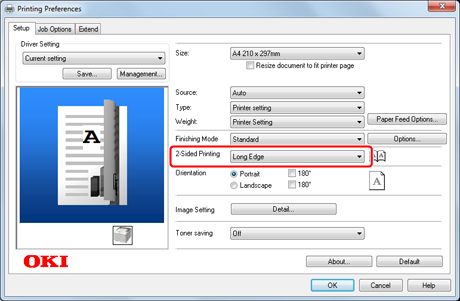
Select [Long Edge] or [Short Edge] from [2-Sided Printing] on the [Setup] tab.
-
Change other settings if necessary, and then click [OK].
The [Printing Preferences] screen closes.
-
Click [Print] on the [Print] screen.
Printing starts.
For Windows PS Printer Driver
-
Open a file to print on a computer.
-
Select [Print] from the [File] menu.
-
Click [Preferences].
-
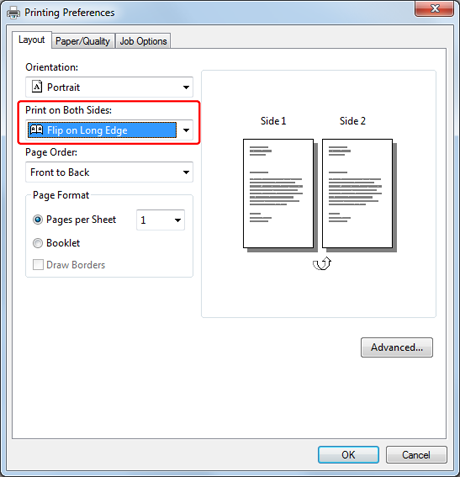
Select [Flip on Long Edge] or [Flip on Short Edge] under [Print on Both Sides] on the [Layout] tab.
-
Change other settings if necessary, and then click [OK].
The [Printing Preferences] screen closes.
-
Click [Print] on the [Print] screen.
Printing starts.
For Windows XPS Printer Driver
-
Select [Print] from the [File] menu.
-
Click [Preferences].
-
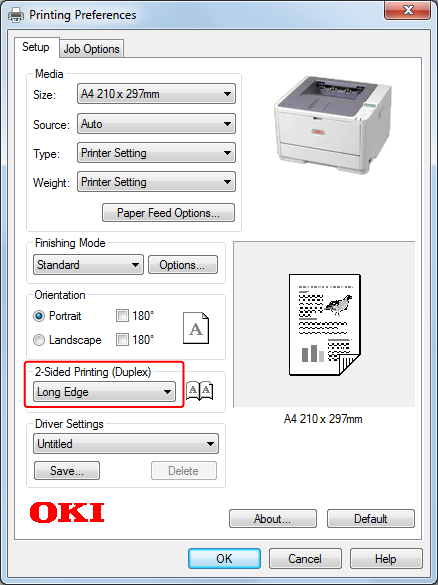
Select [Long Edge] or [Short Edge] from [2-Sided Printing] on the [Setup] tab.
-
Change other settings if necessary, and then click [OK].
The [Printing Preferences] screen closes.
-
Click [Print] on the [Print] screen.
Printing starts.
For Mac OS X PS Printer Driver
-
Select [Print] from the [File] menu.
-
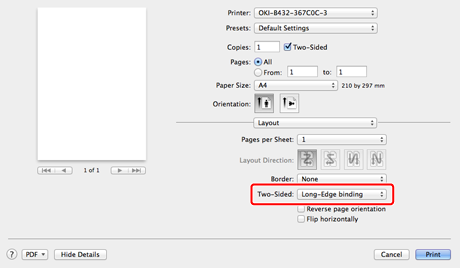
Select [Layout] from the panel menu.
-
Select [Long-Edge Binding] or [Short-Edge Binding] for [Two-Sided].
-
Change other settings if necessary, and then click [Print].
Printing starts.
For Mac OS X PCL Printer Driver
-
Select [Print] from the [File] menu.
-
Select [Setup] from the panel menu.
-
Select [Long-Edge Binding] or [Short-Edge Binding] from [Duplex].
-
Change other settings if necessary, and then click [Print].
Printing starts.