

Collating a Multiple Page Document in Units of Copies (Collated Printing)
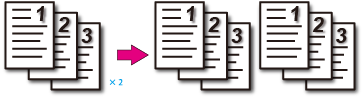
You can print a multiple-page print job in units of copies.
Note
-
Turn off the collating function of the application.
-
The PS printer driver is not available with B412.
For Windows PCL Printer Driver
-
Click [Print] from the [File] menu.
-
Click [Preferences].
-
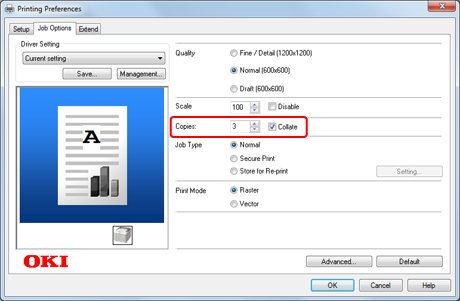
Enter the number of print copies in [Copies] on the [Job Options] tab, and then select the [Collate] check box.
-
Change other settings if necessary, and then click [OK].
The [Printing Preferences] screen closes.
-
Click [Print] on the [Print] screen.
Printing starts.
For Windows PS Printer Driver
-
Click [Print] from the [File] menu.
-
Click [Preferences].
-
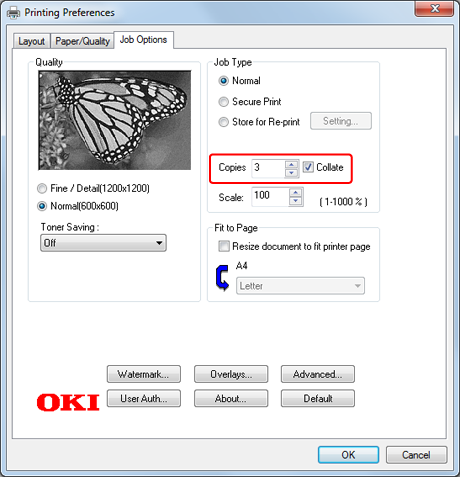
Enter the number of print copies in [Copies] on the [Job Options] tab, and then select the [Collate] check box.
-
Change other settings if necessary, and then click [OK].
The [Printing Preferences] screen closes.
-
Click [Print] on the [Print] screen.
Printing starts.
For Windows XPS Printer Driver
-
Click [Print] from the [File] menu.
-
Click [Preferences].
-
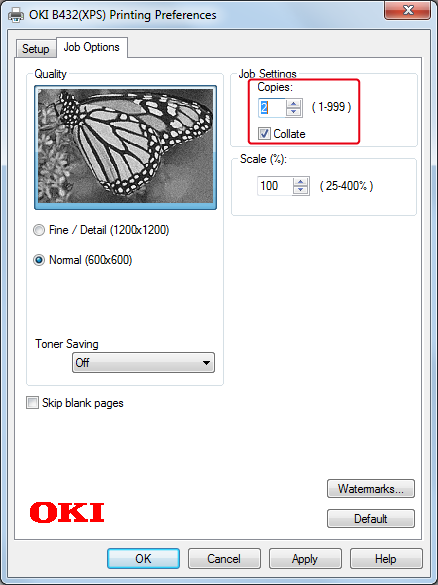
Enter the number of copies in [Copies], and then select the [Collate] check box on the [Job Options] tab.
-
Change other settings if necessary, and then click [OK].
The [Printing Preferences] screen closes.
-
Click [Print] on the [Print] screen.
Printing starts.
For Mac OS X PS Printer Driver
-
Select [Print] from the [File] menu.
-
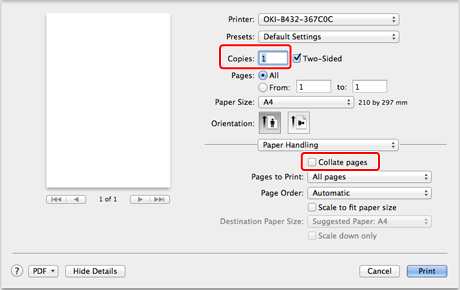
Select [Paper Handling] on the panel menu or clear the [Collate pages] check box on the [Print] screen, and then enter the number of copies in [Copies].
-
Select [Printer Features] on the panel menu, and then select the [Collate] check box in the [Job Options] feature set.
Memo
Printing is performed without using the printer's memory when [Paper Handling] is selected on the panel menu and the [Collate pages] check box is selected.
-
Change other settings if necessary, and then click [Print].
Printing starts.
For Mac OS X PCL Printer Driver
-
Select [Print] from the [File] menu.
-
Enter the number of copies in [Copies].
-
Select [Paper Handling] from the panel menu.
-
Select the [Collate pages] check box.
-
Change other settings if necessary, and then click [Print].
Printing starts.