

Dividing a Document to Print on Some Sheets for Making a Poster
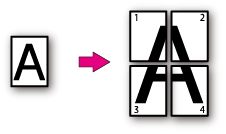
Divide a single page document into multiple parts, and print them on multiple sheets of paper. By combining the separately printed sheets, you can cerate a poster.
Note
-
This function is not available when you are using the IPP network.
-
This function is not available with the Windows PS printer driver and Mac OS X printer drivers.
-
This function is disabled when performing encrypted authentication printing from a client computer that shares the printer via the print server.
For Windows PCL Printer Driver
-
Select [Print] from the [File] menu.
-
Click [Preferences].
-
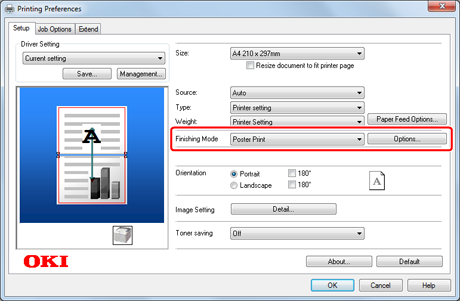
Select [Poster Print] from [Layout] on the [Setup] tab.
-
Click [Options].
-
Set values to [Enlarge], [Add Registration Marks], and [Add Overlap] if necessary, and then press [OK].
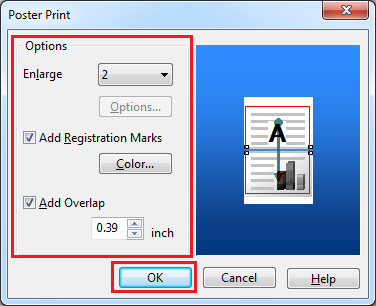
To make an A3 poster by using two sheets of A4 paper, select [A4] for the paper size, and the select [2] for [Zoom].
-
Click [OK] to close the [Poster Print] screen.
-
Change other settings if necessary, and then click [OK].
The [Printing Preferences] screen closes.
-
Click [Print] on the [Print] screen.
Printing starts.
Memo
If this function is not available with the Windows PCL printer driver, select [Start] > [Devices and Printers], right-click the [OKI B432] icon, and then select [Printer properties] > [OKI B432(PCL)] > the [Advanced] tab > [Print Processor] > [OPLAPP3] > [OK].
For Windows XPS Printer Driver
-
Select [Print] from the [File] menu.
-
Click [Preferences].
-
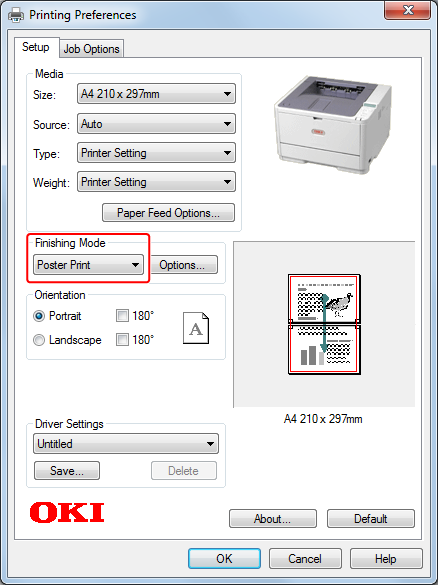
Select [Poster Print] from [Layout] on the [Setup] tab.
-
Click [Preferences].
-
Set values to [Enlarge], [Add Registration Marks], and [Add Overlap] if necessary, and then press [OK].
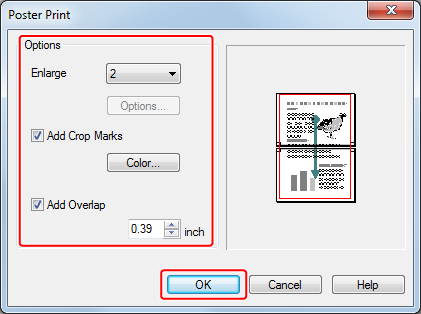
To make an A3 poster by using two sheets of A4 paper, select [A4] for the paper size, and the select [2] for [Zoom].
-
Click [OK] to close the [Poster Print] screen.
-
Change other settings if necessary, and then click [OK].
The [Printing Preferences] screen closes.
-
Click [Print] on the [Print] screen.
Printing starts.