

Adjusting the Image Finished Quality
The overall printing result of an image is determined by the printer driver settings. Keep adjusting these settings until you obtain your preferred result.
Note
This function is not available with the Windows PS/XPS printer drivers and Mac OS X PS printer driver.
For Windows PCL Printer Driver
-
Select [Print] from the [File] menu.
-
Click [Preferences].
-
Click [Detail] on the [Setup] tab.
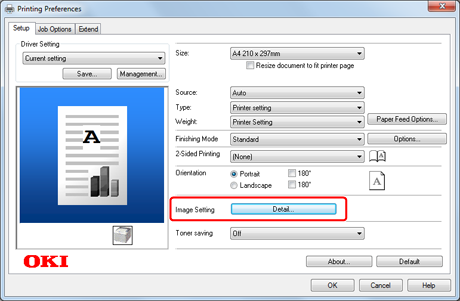
-
Change the [Manual Settings] settings on the [Detail] screen, and then click [OK].
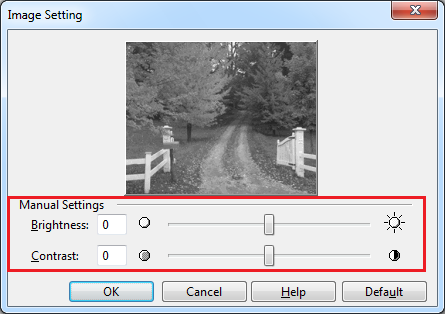
-
Change other settings if necessary, and then click [OK].
The [Printing Preferences] screen closes.
-
Click [Print] on the [Print] screen.
Printing starts.
For Mac OS X PCL Printer Driver
-
Select [Print] from the [File] menu.
-
Select [Image] from the panel menu.
-
Change the [Manual Settings] setting on the [Image] panel.
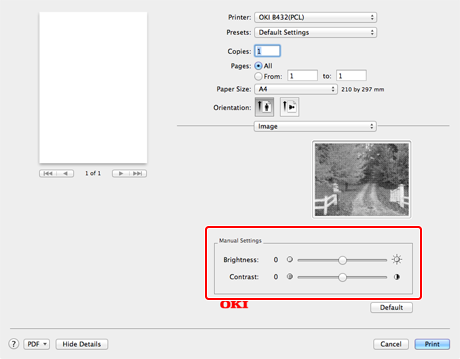
-
Change other settings if necessary, and then click [Print].
Printing starts.