

Storing Print Data in the Printer before Printing
You can store print jobs in the memory that is integrated in the printer. This allows you to finish your work on your computer early, which makes it possible for your computer to process other tasks while the printer is operating in the background.
Note
-
If you cannot store the spooled data due to insufficient free space in the internal memory of the printer, a message is displayed to inform you that the file system is full, and the print job is not executed.
-
This function is not available with the Windows XPS printer driver and Mac OS X printer drivers.
-
The PS printer driver is not available with B412.
For Windows PCL Printer Driver
-
Select [Print] from the [File] menu.
-
Click [Preferences].
-
Click [Advanced] on the [Job Options] tab.
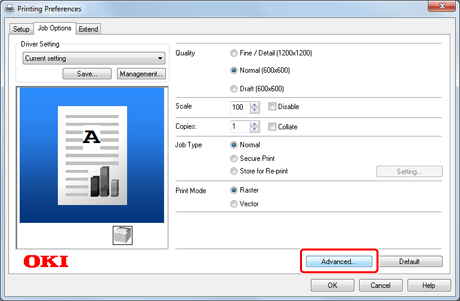
-
Select [Job Spool], and then select [On] for setting change.
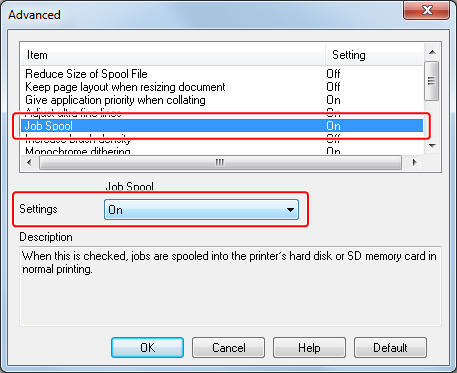
-
Change other settings if necessary, and then click [OK].
The [Printing Preferences] screen closes.
-
Click [Print] on the [Print] screen.
Printing starts.
For Windows PS Printer Driver
-
Select [Print] from the [File] menu.
-
Click [Preferences].
-
Select the [Job Options] tab.
-
Click [Advanced].
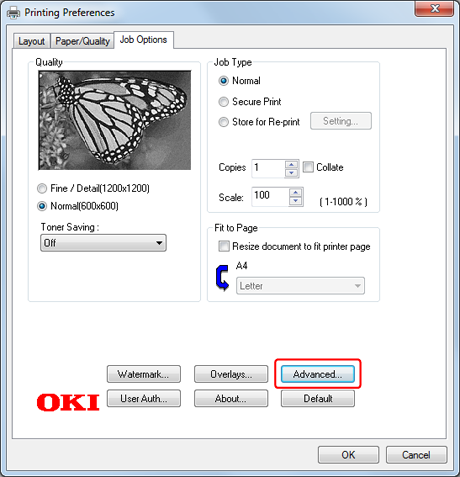
-
Select the [Job Spool] check box, and then click [OK].
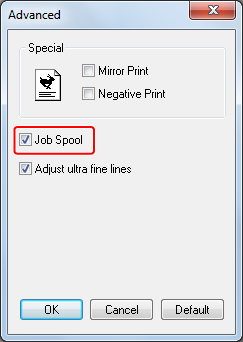
-
Change other settings if necessary, and then click [OK].
The [Printing Preferences] screen closes.
-
Click [Print] on the [Print] screen.
Printing starts.