

Registering Forms (Form Overlay)
Logos and other forms can be registered in the printer for overlay printing. This section describes how to register forms.
About how to print overlays
Overlaying Forms or Logos (Overlay Print)
To use the Storage Manager, you need to install Configuration Tool.
Note
-
This function is not available with Windows XPS Printer Driver.
-
This function is not available with Mac OS X Printer Driver.
-
To use this function, you need to be logged in as the administrator when working with the Windows PS printer driver.
-
The PS printer driver is not available with B412.
Memo
The example below shows the procedure for the PS printer driver.
Creating a Form
-
Click [Start], and then select [Devices and Printers].
-
Right-click the printer icon, and then select the necessary printer driver from [Printer properties].
-
Select the [Ports] tab, select the [FILE:] check box in [Print to File], and then click [OK].
-
Create the form that you want to register in the printer.
Proceed to step 9 if you are using the Windows PCL Printer Driver.
-
Select [Print] from the [File] menu.
-
Click [Preferences].
-
Select the [Job Options] tab, and then click [Overlays].
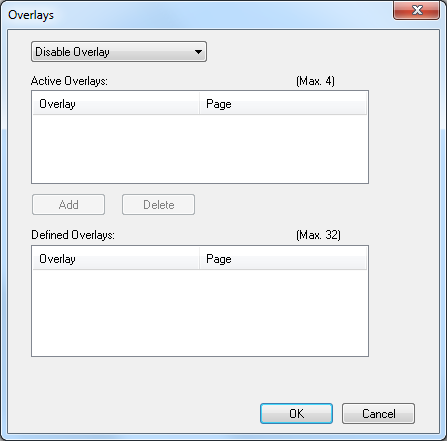
-
Select [Create Form].
-
Start printing.
-
Enter a file name for saving the form, and then select a location to save the form.
-
Restore the original [Print to File] setting on the [Ports] tab.
Registering a Form in the Printer with Configuration Tool
-
Click [Start], and then select [All Programs] > [Okidata] > [Configuration Tool] > [Configuration Tool].
-
Select [Storage Manager] from the [Plug-in] menu.
-
Click
 (New Project).
-
Click
 (Add File to Project), and then select the created form file.
The form is added to a project.
-
Click the form file.
-
Enter the ID in [ID], and then click [OK].
Note
Do not change [Target Volume] and [Local path].
-
Select the printer in the window at the bottom of the Storage Manager plug-in screen.
-
Click
 (Send project file to printer).
 -
Click [OK].
Proceed to "Overlaying Forms or Logos (Overlay Print)" to perform overlay printing.