

For Mac OS X (Panel Language Setup)
You can change the display language used on the operator panel.
About the Operating Environment
-
Print a menu map of the printer.
Check the "Language format" number that is printed on the menu map.
If you are using a TCP/IP connection, check the printer's IP address on the menu map.
How to check the menu map
-
Insert the "Software DVD-ROM" into a computer.
-
Double-click [Utility] > [Panel Language Setup] > [Panel Language Setup].
-
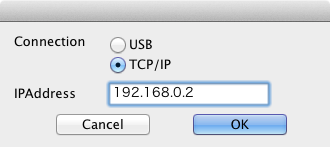
Select a connection method.
Select [USB] or [TCP/IP]. If you select TCP/IP connection, enter the printer's IP address that you checked on the menu map.
-
Click [OK].
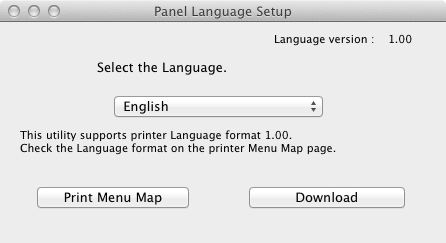
A main dialog box appears.
-
Check that the "Language Format" value on the menu map and the value displayed on the screen meet the following conditions.
Condition 1: The first numbers of the versions match.
Condition 2: The Language version value that is displayed on the screen is equal to or newer (greater) than the "Language Format" value.
Memo
If Condition 1 is not met, the language set cannot be downloaded. If you attempt downloading with Condition 1 not being met, an error is displayed on the operator panel. To clear the error, restart the printer. If Condition 1 is met but Condition 2 is not met, you can use the printer but the names of some settings are displayed in English.
-
Select a language.
-
Click [Download].
The language setup file is sent to the printer, and a message indicating the completion of the transmission is displayed.
-
Restart the printer.