Turning the Printer Off
Note
Holding the power switch down for 5 seconds or more forcibly turns the printer off. Use this method only if a problem occurs.
For details on printer problems, refer to "Troubleshooting".
-
Press the power switch for approximately a second.
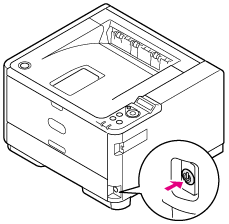
The [SHUTTING DOWN. PLEASE WAIT TURN OFF AUTOMATICALLY] message is displayed on the operator panel, and the power switch LED lamp flashes at approximately one-second intervals.
After a while, the printer automatically turns off, and the power switch LED lamp goes out.