

Connecting a Computer to the Printer via a USB Interface
-
Prepare a USB cable.
A USB cable is not provided with the printer. Prepare a USB 2.0 cable separately.

Memo
If you want to connect in USB 2.0 Hi-Speed mode, use a Hi-Speed USB 2.0 USB cable.
-
Turn the printer and computer off.
-
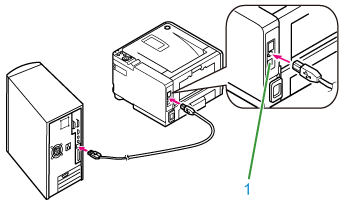
Insert one end of the USB cable into the USB interface connector (1) on the printer.
Note
Do not insert the USB cable into the network interface connector. It may cause a malfunction.
-
Insert the other end of the USB cable into the USB interface connector on the computer.
Note
For Windows, do not insert the other end of the USB cable into the computer until an instruction is displayed on the screen when the printer driver installation is in progress.