Replacing the Image Drum
Note
-
Use extra care when handling the image drum (the green cylinder), because it is fragile.
-
Do not expose the image drum to direct sunlight or strong light (approximately 1,500 lux or more). Even under room lighting, do not leave the image drum for 5 minutes or more.
-
Use OKI genuine consumables to ensure optimum performance of the products.
-
Charges for services for problems caused by the use of consumables other than OKI genuine consumables are incurred, regardless of the warranty or in the maintenance contract. (Although use of non-genuine consumables does not always result in problems, use extra care when using them.)
-
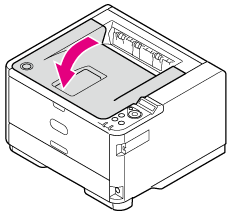
Press the [OPEN] button.

-
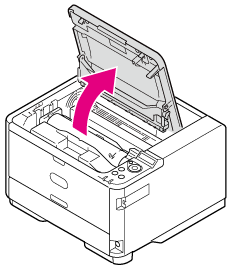
Open the top cover.
Memo
Please recycle toner cartridges. If you have to dispose of used image drums and toner cartridges, put them into polyethylene bags or other container, and be sure to follow the regulations or instructions of your local government.
-
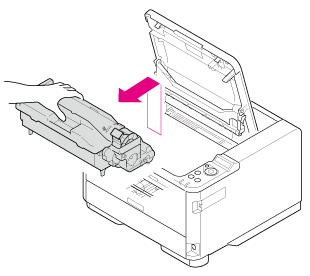
Take the image drum out from the printer.

Be sure not to throw the used image drum and toner cartridge into a fire.
The toner inside may scatter and ignite, resulting in burns.Take the image drum out upward gently.
The toner cartridge is removed along with the image drum.
-
Unpack a new image drum.
-
Remove the silica gel pack.

Note
Be sure to use a new image drum. Accessories and image drums for other printers cannot be used.
-
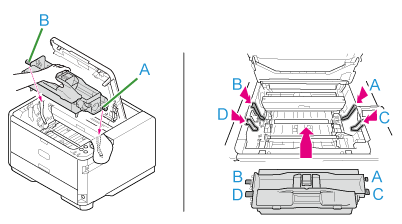
Align the image drum pins (A to D) with the grooves (A to D) inside the printer, and then install the image drum into the printer gently.
-
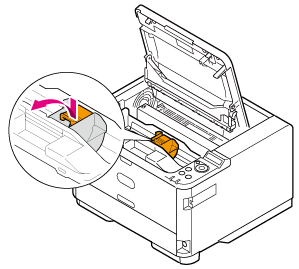
Remove the toner cover (orange) of the image drum that is installed in the printer by pressing the tab in the direction of the arrow.
Memo
Dispose of the toner cover as incombustible waste.
Note
-
Use caution when removing the toner cover, as there is toner on its back side.
-
Use extra care when handling the image drum (the green cylinder), because it is fragile.
-
Do not expose the image drum to direct sunlight or strong light (approximately 1,500 lux or more). Even under room lighting, when leaving the image drum cartridge for 5 minutes or more, put sheets of paper over it to shield it from the light.
Even with sheets of paper put over the image drum cartridge, do not leave it for one hour or more.
-
-
Install the new toner cartridge.
About how to install the toner cartridge
-
Close the top cover.