

Changing from a Computer
You can change the administrator password of the printer from the Web page. The administrator password specified on the Web page is used when logging in to the printer as the administrator from the Web page or operator panel.
-
Open the Web page of the printer.
-
About the IP Address of the printer
-
How to log in to the Web page
-
-
Select [Admin Setup].
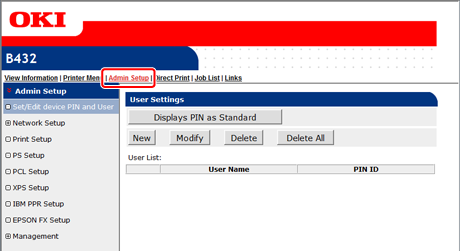
-
Select > [Management] > [Change Password].
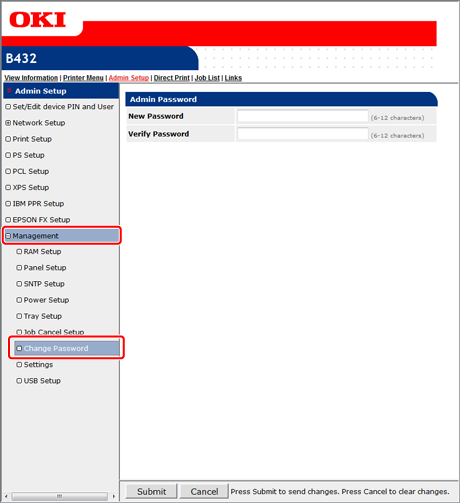
-
Enter a new password in [New Password].
Memo
-
The entered password is displayed as "
 " on the screen.
 -
You can enter 6 to 12 alphanumeric characters for the password.
-
The password is case sensitive.
-
-
Re-enter a new password in [Verify Password].
The password is not displayed. Write down the password and keep it in a safe place.
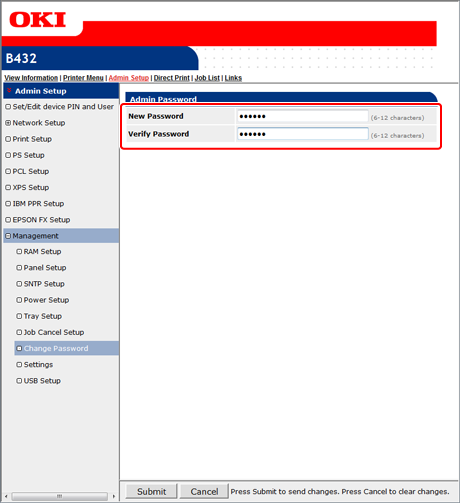
-
Click [Submit].
The new settings take effect when the network function of the printer restarts.
Note
The password is different from that of [Network Setting] in Configuration Tool.
Memo
You do not need to restart the printer. The next time you log in as the administrator, you can use the new password.