

Using IPP Print
IPP Print enables you to send a print job data to the printer via the Internet.
Enabling IPP Print
IPP Print is disabled by factory default. Enable IPP Print before performing IPP Print.
-
Open the Web page of the printer.
About the IP Address of the printer
How to log in to the Web page
-
Select [Admin Setup].
-
Select [Network Setup] > [IPP].
-
Select [Enable].
-
Click [Submit].
Setting the Printer as the IPP Printer in a Windows Environment
Add the printer to a computer as an IPP printer.
-
Available OS
Windows 8.1/Windows Server 2012 R2/Windows 8/Windows Server 2012/Windows 7/Windows Vista/Windows Server 2008 R2/Windows Server 2008/Windows Server 2003
Note
IPP is disabled by factory default.
To print with IPP, open the Web page, select > [Network Setup], and then set [IPP].
-
Click [Start], and then select [Devices and Printers] > [Add a printer].
-
Select [Add a network, wireless or Bluetooth printer] in the [Add a printer] wizard.
-
Select [The printer that I want isn't listed] from the list of available printers.
-
Select [Select a shared printer by name].
-
Enter "http://(The IP address of the printer)/ipp" or "http://(The IP address of the printer)/ipp/lp", and then click [Next].
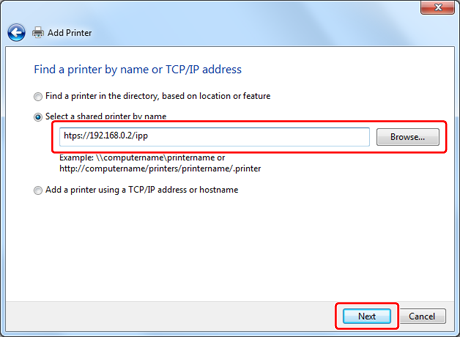
-
Click [Have Disk].
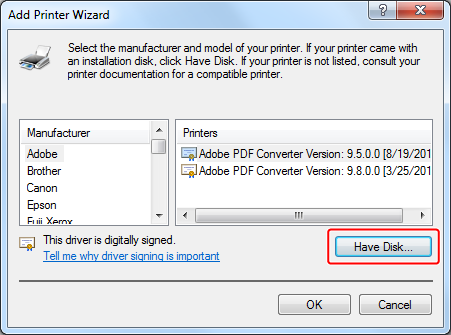
-
Insert the "Software DVD-ROM" into a computer.
-
Enter one of the following values in [Copy manufacturer's files from:], and then click [Browse].
-
If installing the PCL printer driver: "D:
 DriversENPCL"
 -
If installing the PS printer driver: "D:
DriversENPS" -
If installing the XPS printer driver: "D:
DriversENXPS"
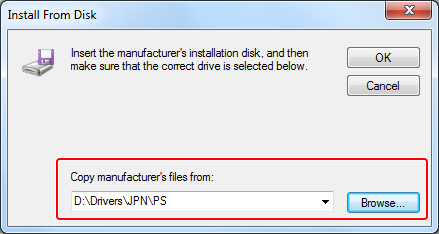
Memo
The above values are examples of when the DVD-ROM drive is set to the D drive.
-
-
Select the INF file, and then click [Open].
-
Click [OK].
-
Select a model, and then click [OK].
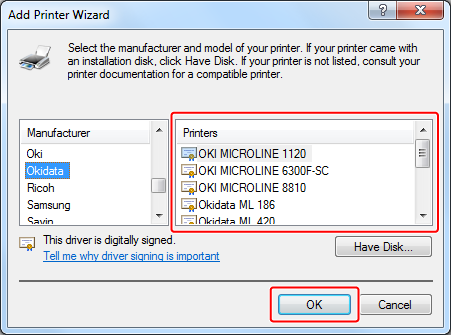
-
Click [Next].
-
Check the printer name, and then select the [Set as the default printer] check box, and then click [Finish].
-
Right-click the [OKI B432] icon, and then select [Printer properties] > [OKI B432(*)].
* Select the type of the added printer driver.
-
Click [Printer Test Page] on the [General] tab.
If a test page is printed, the setup is complete.
Setting the Printer as the IPP Printer in a Mac OS X Environment
Add the printer to a computer as an IPP printer.
-
Insert the "Software DVD-ROM" into a computer, and then install the printer driver.
-
Select [System Preferences] from the Apple menu.
-
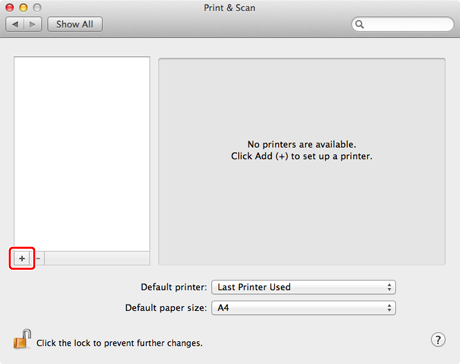
Click [Print & Scan].
-
Click [+].
-
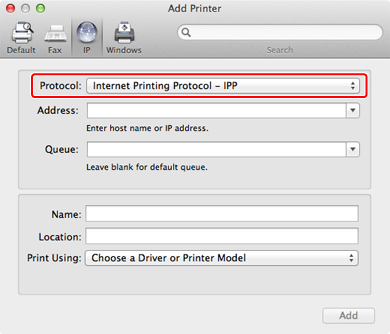
Click the [IP] tab.
-
Select [IPP (Internet Printing Protocol)] from [Protocol].
-
Enter the IP address of the printer in [Address].
-
Enter "ipp/lp" in [Queue].
-
Click [Add].
-
Check that the printer is registered in [Print & Scan].
Performing IPP Print
The following procedure uses Notepad as an example. The descriptions may vary depending on your application.
-
Open a file to print.
-
Select [Print] from the [File] menu.
-
Select the created IPP printer from [Printer], and then click [Print].