

Registering a Printer to OKI LPR Utility
Add a printer to OKI LPR Utility.
Note
-
You must have the administrator rights.
-
If you cannot add a printer, exit OKI LPR Utility, select [Start] > [All Programs] > [Okidata] > [OKI LPR Utility], right-click [OKI LPR Utility], select [Run as administrator], and then start OKI LPR Utility.
-
If another user is logged in by using the easy user switch function, a printer cannot be added and deleted.
-
You cannot set the printer that is already registered in OKI LPR Utility. To change the port, select [Confirm Connections] from [Remote Print].
-
Start OKI LPR Utility.
-
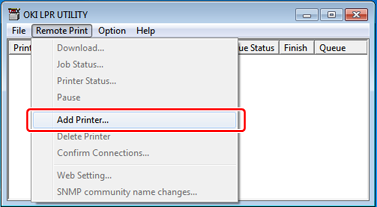
Select [Add Printer] from the [Remote Print] menu.
-
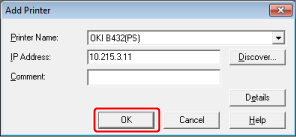
Select [Printer Name], and then enter the IP address.
Network printers and printers connected to the LPR port are not displayed.
-
To select a network printer, select [Discover].
-
Click [OK].
Note
A printer is displayed in [Printer] only if the printer driver is added to the [Printer and Faxes] folder. A printer is not displayed if the printer driver is set to a network printer.
Memo
To search for an OKI printer on a network, click [Discover].