

Starting OKI LPR Utility
You can print via a network, manage printing, and check the status of the printer by using OKI LPR Utility.
To use OKI LPR Utility, TCP/IP must be enabled.
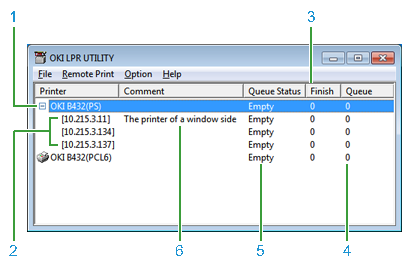
|
Item |
Reference |
|
|---|---|---|
|
1 |
Printer that is registered in OKI LPR Utility |
|
|
2 |
Displayed when a document is printed from multiple printers at the same time. |
Printing the Same Document from the Registered Multiple Printers |
|
3 |
Indicates the number of jobs (data) that are sent. |
- |
|
4 |
Indicates the number of jobs (data) that are not sent. |
- |
|
5 |
Indicates the status of OKI LPR Utility printer (this is different from the actual status of the printer). |
|
|
6 |
Displayed if [Show comments] is selected in the option menu. |
Note
You cannot use OKI LPR Utility with a shared printer. Use the standard TCP/IP port.
-
Click [Start], and then select [All Programs] > [Okidata] > [OKI LPR Utility] > [OKI LPR Utility].