

Printing on Envelopes
First, load the envelopes in the MP tray, and then register the paper settings in the printer. Next, start an application, and then set the printing settings with the printer driver.
Note
-
Printing on envelopes is not possible from Tray 1 and Tray 2 (optional). They are printed from the MP tray.
-
Printing speed is slow.
-
Jobs are automatically discarded when the time taken to load the envelopes exceeds the manual timeout time (factory default setting is one minute) set from the system configuration menu (when the MP tray is treated as manual paper feeding for printing).
-
The PS printer driver is not available with B412.
Loading Envelopes
-
Load envelopes in the MP tray.
-
Press
 or
or  on the operator panel to display [MENUS], and then press
  (OK).
(OK).[TRAY CONFIG] is displayed.
-
Press
(OK) to display [MP TRAY CONFIG]. -
Press
(OK) to display [PAPERSIZE]. -
Press
(OK) to make [A4] flash. -
Press
or to display [Envelope*].* Select a type of envelope.
-
Press
(OK) to add [*] to the right side of the set value. -
Press
or to display [MEDIATYPE], and then press (OK). -
Press
(OK) to make [PLAIN] flash. -
Press
or to display [ENVELOPE]. -
Press
(OK) to add [*] to the right side of the set value. -
Press
 or
or  to display [MEDIAWEIGHT], and then press (OK).
[MEDIUM] flashes.
-
Press
or to display [HEAVY]. -
Press
(OK) to add [*] to the right side of the set value. -
Press
 (ONLINE) to select [READY TO PRINT].
Next, set printing settings from a printer driver.
For Windows PCL Printer Driver
-
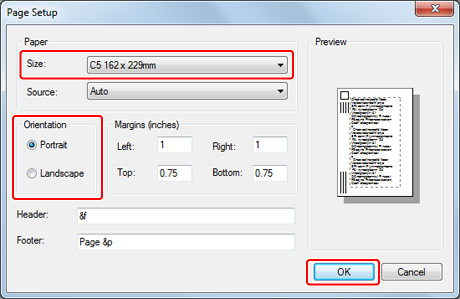
Select [Page Setup] from the [File] menu.
-
Select an envelope size for [Size], and [Portrait] or [Landscape] for [Orientation], and then click [OK].
-
Select [Print] on the [File] menu.
-
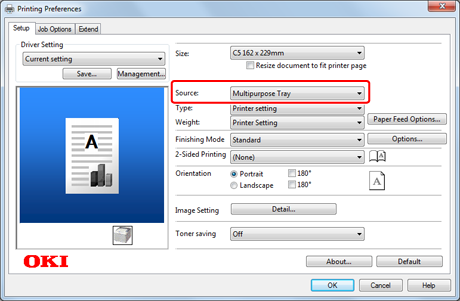
Click [Preferences].
-
Select [MultiPurpose Tray] for [Source] on the [Setup] tab.
-
Click [Print] on the [Print] screen.
Printing starts.
For Windows PS Printer Driver
-
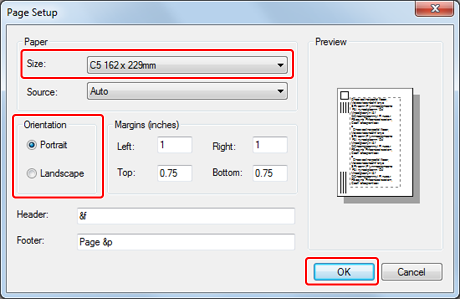
Select [Page Setup] from the [File] menu.
-
Select an envelope size for [Size], and [Portrait] or [Landscape] for [Orientation], and then click [OK].
-
Select [Print] from the [File] menu.
-
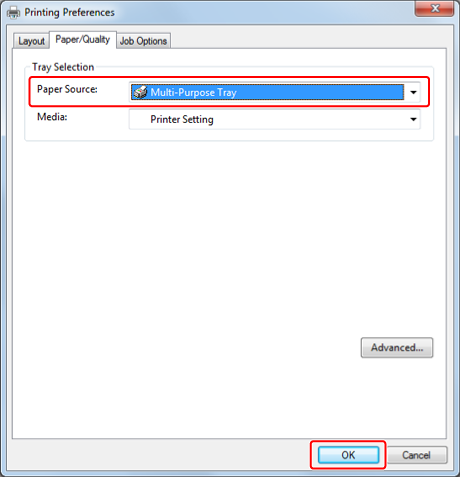
Click [Preferences].
-
Select [Multi-Purpose Tray] for [Paper Source] on the [Paper/Quality] tab, and then click [OK].
-
Click [Print] on the [Print] screen.
Printing starts.
For Windows XPS Printer Driver
-
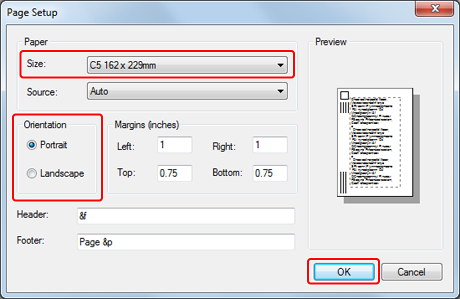
Select [Page Setup] from the [File] menu.
-
Select an envelope size for [Size], and [Portrait] or [Landscape] for [Orientation], and then click [OK].
-
Select [Print] from the [File] menu.
-
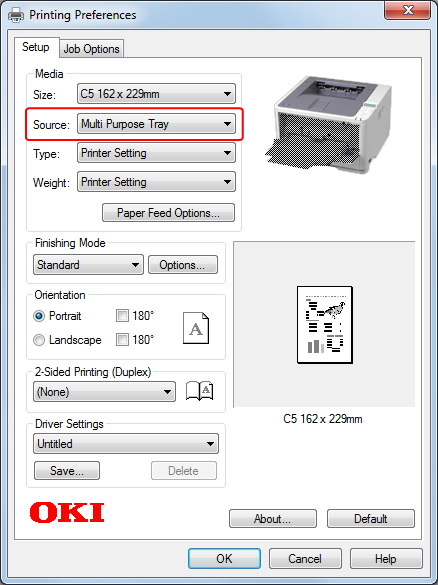
Click [Preferences].
-
Select [Multi Purpose Tray] for [Source] on the [Setup] tab, and then click [OK].
-
Click [OK].
The [Printing Preferences] screen closes.
-
Click [Print] on the [Print] screen.
Printing starts.
For Mac OS X PS Printer Driver
-
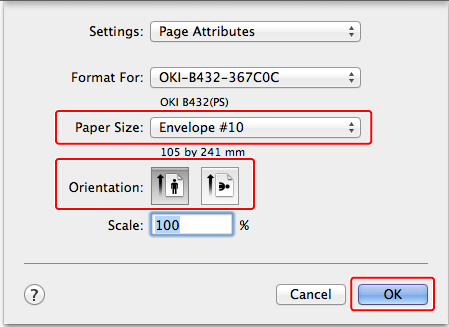
Select [Page Setup] from the [File] menu.
-
Select [Envelope*] for [Paper Size], and the appropriate orientation for [Orientation], and then click [OK].
* Select an envelope type.
-
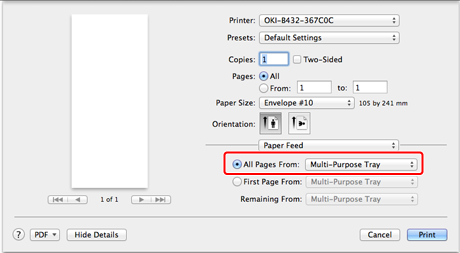
Select [Print] from the [File] menu.
-
Select [Multi-Purpose Tray] for [All Pages From] on the [Paper Feed] panel.
Memo
To print on envelopes in landscape orientation (printing on horizontal envelopes with the flaps on the right side), select the landscape orientation icon for [Orientation] on the [Page Setup] screen.
-
Select [Printer Features] from the panel menu.
-
Click [Print].
Printing starts.
For Mac OS X PCL Printer Driver
-
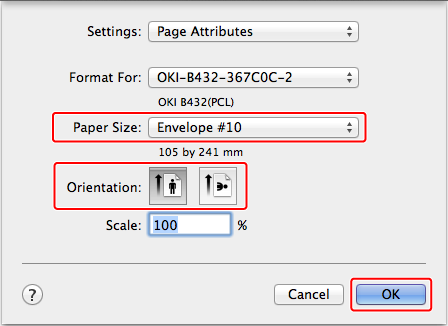
Select [Page Setup] from the [File] menu.
-
Select [Envelope*] from [Paper Size].
* Select an envelope type.
-
Select the appropriate orientation for [Orientation], and then click [OK].
-
Select [Print] from the [File] menu.
-
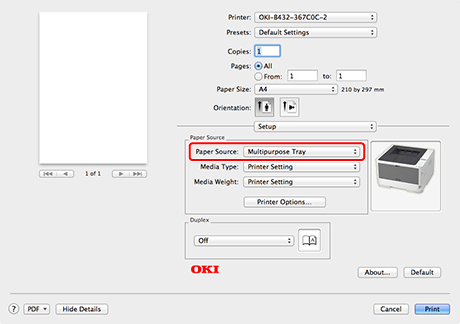
Select [Setup] from the panel menu.
-
Select [Multipurpose Tray] from [Paper Source].
Memo
To print on envelopes in landscape orientation (printing on horizontal envelopes with the flaps on the right side), select the landscape orientation icon for [Orientation] on the [Page Setup] screen.
-
Click [Print].
Printing starts.