

Loading Envelopes
This section describes how to load envelopes in the MP tray.
-
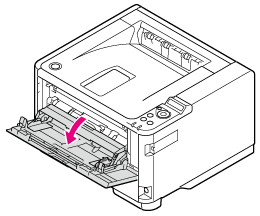
Open the MP tray.
-
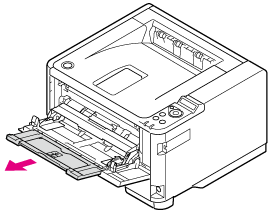
Pull the paper support out.
-
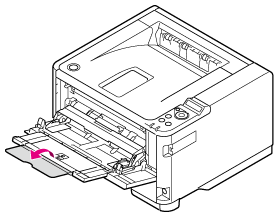
Open the sub support.
-
Adjust the manual feeding paper guide (1) to the width of paper to be loaded.
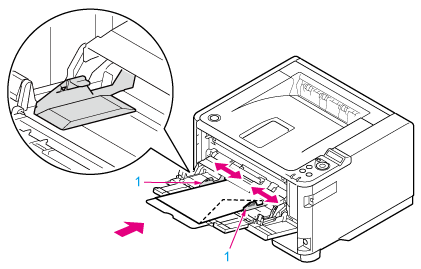
Paper loading direction
Com-9, Com-10, DL, C5, C6, Monarch

-
Insert the paper with the print side up until its edge touches the paper feed entrance.
Note
Do not load paper over the "
 " mark.
-
Open the faceup stacker on the rear of the printer.
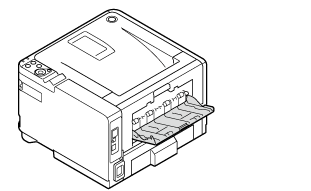
Note
Do not open the faceup stacker during printing. Paper jams may result.
-
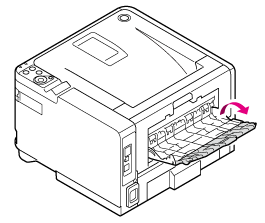
Open the faceup stacker.
Papers are output to and stacked in reverse order of printing on the faceup stacker.
-
Pull the paper support out.

Register the loaded paper in the printer. Proceed to "Registering the Paper Size, Type, or Weight".
To set paper on the operator panel and set printing with the printer driver, proceed to "Printing on Envelopes".
Note
-
Use paper stored under proper temperature and humidity conditions. Do not use paper that has curled or warped from humidity (using such paper can cause wrinkles to develop).
-
Adjust the paper guide and paper stopper so that there is no gap between them and the paper. Do not place the paper too tightly against the paper guide or paper stopper to avoid bending the paper.
-
As shown below, the number of sheets of paper (media weight of 80 g/m2) that can be loaded in each tray varies depending on the model.
-
B412, B432, ES4132
Tray1:250 sheets
Tray2:530 sheets
MP Tray:100 sheets
-
B512, ES5112
Tray1:530 sheets
Tray2:530 sheets
MP Tray:100 sheets
-
-
Load the paper so that the paper is fed in longitudinal direction.
-
Do not load paper of different sizes, types, or weights in the same tray.
-
To add paper, remove the already loaded paper, stack up it onto the new paper, and then align the edges of all the paper.
-
Do not push with too much force when inserting the paper cassette.
-
Do not pull the paper cassette out during printing.
-
Paper cassettes cannot hold envelopes.
-
Warpage in envelopes may cause feed problems. Use proper envelopes. Envelopes should not have warpage over 2 mm.
-
Load the envelopes so that the envelopes are fed in longitudinal direction.
-
Bent flaps may cause feed problems. Ensure that there are no bent flaps before use.
-
Do not place any objects other than printing paper in the MP tray, or push into the MP tray, or otherwise apply force to the MP tray.