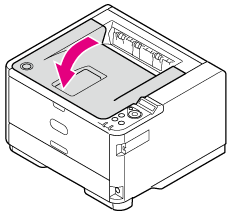
If the Error Code is "380", "381", "382", "385" or "390" (inside the Printer)
This section describes how to clear a paper jam in the paper feed part inside the printer.
-
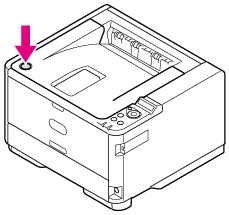
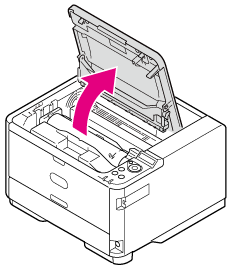
Open the top cover.

Burns may result.

Do not touch the fuser, because it is very hot.
-
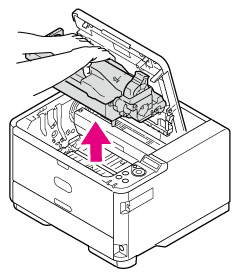
Take the image drum out.
Note
-
Use extra care when handling the image drum (the green cylinder), because it is fragile.
-
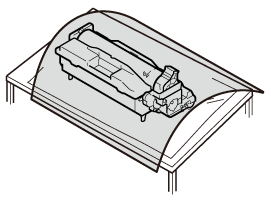
Do not expose the image drum to direct sunlight or strong light (approximately 1,500 lux or more). Even under room lighting, when leaving the image drum cartridge for 5 minutes or more, put sheets of paper over it to shield it from the light.
Even with sheets of paper put over the image drum cartridge, do not leave it for one hour or more.
-
-
Remove the jammed paper if necessary.
-
If the top end of the paper is visible
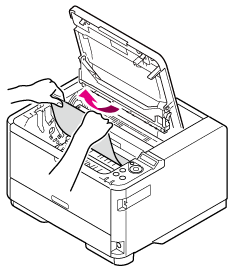
Hold the top end of the jammed paper, and then pull the paper out gently.
-
If the top end of the paper is visible behind the transparent resist guide
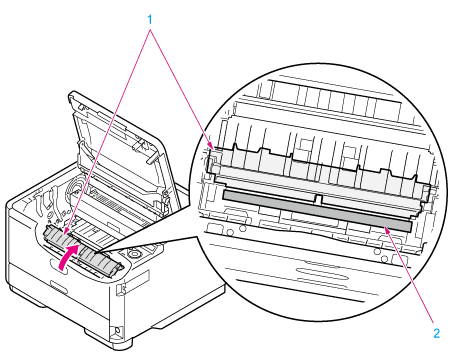
Turn the resist guide (1) toward the fuser unit side, hold the top end of the jammed paper (2), and then pull the paper out gently.
-
If neither the top end nor the bottom end of the paper is visible
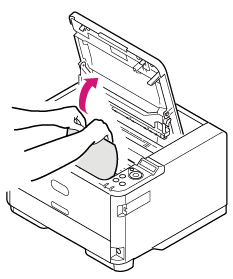
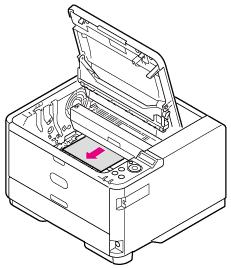
Slide the jammed paper in the direction of the arrow, hold the top end of the paper, and then pull the paper out gently.
-
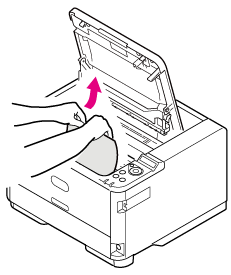
If the bottom end of the paper is visible
Hold the rear end of the jammed paper, and then pull the paper out gently.
-
-
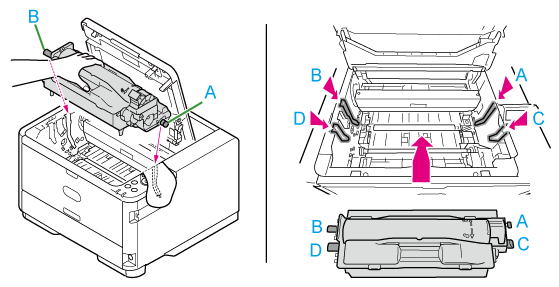
Align the guide posts (ABCD) on the left and right sides of the image drum with their guide grooves on the left and right sides inside the printer, and then put the image drum back into the printer gently.
-
Close the top cover.