

Checking the IPv6 Address
An IPv6 address is automatically assigned. The obtained IPv6 address is displayed on the Web page and the network setting information (Network Information).
Checking from the Web Page
-
Open the Web page of the printer.
-
About the IP Address of the printer
-
How to log in to the Web page
-
-
Click [View Information].
-
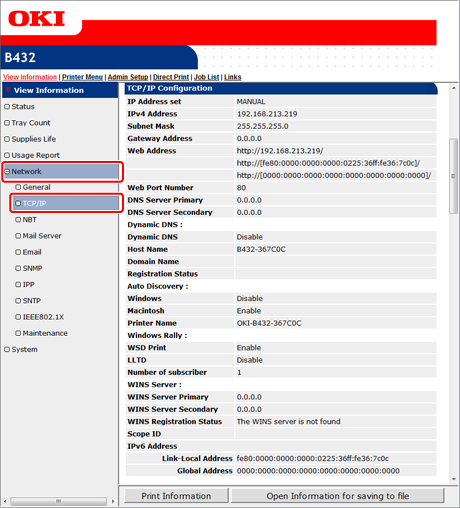
Select [Network] > [TCP/IP].
Check that the link local address and global address. In the environment shown in the figure, the global address is not obtained.
Memo
-
If the global address is displayed only with zeros, your router may cause an error.
-
For details on how to connect your computer to the printer with IPv6, refer to the manual of your computer or application.
Checking from the Operator Panel
-
Press
 or
or  on the operator panel to display [CONFIGURATION], and then press
  (OK).
(OK). -
Press
or to display [Network], and then press (OK). -
Press
or , and then check the IPv6 address in [IPV6 LOCAL] and [IPV6 GLOBAL].